Vinyl Presence · free for Windows
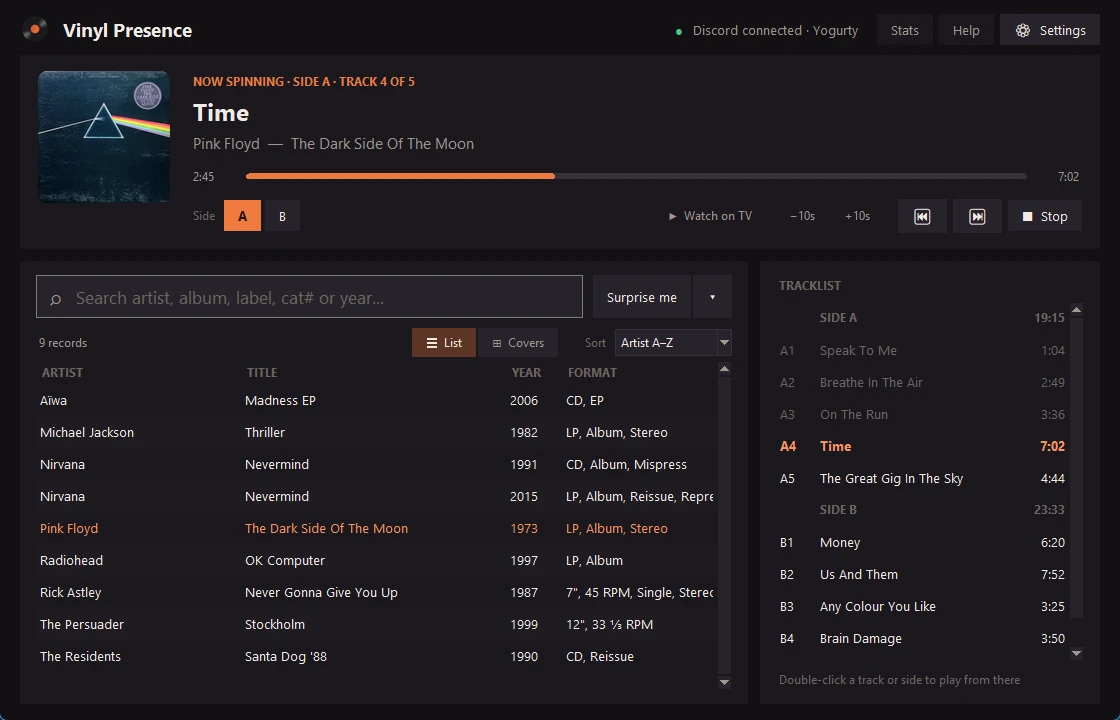
Pick the record you just put on, and your Discord profile shows the cover, the track and a progress bar through the side. Like Spotify, but for real vinyl.
Free and open source. Nothing to host, no account needed.
How it works
No Discord developer stuff, no server, no sign-up. Just a small app on your PC.
Get VinylPresence.exe and open it while Discord is running. That's all it needs to connect.
Type your Discogs username and your records load by themselves. Or import your Discogs CSV.
Type a few letters of the record you put on and press Enter. Your status follows, track by track.
Features
Artist, album, label, catalog number or year. Small typos are fine.
Knows every side, moves to the next track by itself and reminds you to flip.
Browse your collection as album covers, like flipping through your shelf.
Hours listened, your top records and artists, and a picture to share in Discord.
Surprise me picks a record you haven't played in a while, or what you played a year ago today.
A stylus counter tells you when your needle is worn and due for a new one.
The records you play on your turntable count on your Last.fm profile.
The music video of the song that's on plays on your Chromecast, in sync with the record.
Share what you play in a Discord channel, together with the rest of the Hangout.
The app
It sits in the tray next to the clock, starts with Windows if you like, and updates itself with one click.

Live from the Hangout
Vinyl Presence users who switch on Show me on the Live page show up here while their record plays.
Loading…
FAQ
Yes, completely. Vinyl Presence is open source, so anyone can see how it works on GitHub.
That message shows up for apps that aren't code-signed, which costs a lot of money for a hobby project. Click More info → Run anyway. The full source code is on GitHub if you want to check it.
Not as a download yet. It's a Windows app for now.
Use the Discord desktop app, not the browser version, and turn on User Settings → Activity Privacy → Share your detected activities with others. Also check that you're not set to Invisible.
Your collection and history stay on your computer. Your Discord status shows the record you pick. Once a day the app says "I'm here" to this site with a random number, so we can count users; you can switch that off. Your name and records only show up here if you switch on the Live page.
In the app, go to Settings → Sharing & tray and switch on Show me on the Live page. It shows your Discord name and picture with the record you're playing, and disappears when you stop.
It's the easiest way to load your collection, but you can also import a CSV export from Discogs.
Vinyl Hangout is a Discord server for people who love records. Share what's on your turntable, ask for setup help, or just say hi.
Join Vinyl Hangout